qBittorrent stops downloading after a while when virtual network adapters, ISP UDP throttling, or exhausted socket pools sever peer connections, while uTorrent triggers "Error: Write to Disk" and stops seeding due to 32-bit cache limits and NTFS locks. Rebinding your network adapter or switching to Vortex Downloader resolves these stalls.
Table of Contents
- BitTorrent Error & Stall Diagnostic Matrix (Windows 11 & 10)
- Interactive BitTorrent Swarm Stall & Disk I/O Diagnostic
- Why qBittorrent Stops Downloading After a While (4 Steps to Fix)
- How to Fix uTorrent "Error: Write to Disk" and Not Seeding on Windows 11
- Architecture Comparison: uTorrent vs. qBittorrent vs. Vortex
- Frequently Asked Questions (FAQ)
BitTorrent Error & Stall Diagnostic Matrix (Windows 11 & 10)
BitTorrent clients encounter distinct networking, permissions, and memory bottlenecks on Windows 10 and 11. Cross-reference your exact client symptom against its underlying architectural root cause and configuration fix:
| Exact Symptom or Error | Client Affected | Root Cause on Windows 11 & 10 | Manual Configuration Fix | Permanent Fix in Vortex Downloader (v1.1.3) |
|---|---|---|---|---|
| Stops downloading after a while / Stalled (0 B/s) | qBittorrent & uTorrent | Router NAT table overloaded by μTP UDP flood or client bound to dead VPN/WSL adapter. | Bind active network adapter in Options > Advanced and cap global connections at 350. | Auto-Managed 64-Bit Socket Pool + 16+ Injected Tier-1 Trackers. |
| Error: Write to Disk (Access is denied) | uTorrent / BitTorrent | Windows Controlled Folder Access or read-only NTFS folder permissions blocking 32-bit .exe. | Whitelist client in Windows Security or save to a short C:\Downloads path. | Microsoft Defender Verified 64-Bit Binary + Long NTFS Path support. |
| Error: Write to Disk (Not enough memory) | uTorrent Classic (32-Bit) | 32-bit virtual memory ceiling (1.8 GB) exceeded on fast gigabit fiber lines. | Cap manual disk cache at 512 MB in Preferences > Advanced > Disk Cache. | 64-Bit Memory-Mapped Sparse Files (Zero RAM cache overflow). |
| Not seeding / Seeding 0 B/s | uTorrent & qBittorrent | UPnP/NAT-PMP port blocked by Windows Firewall or ISP CGNAT; dead tracker announce. | Enable UPnP / NAT-PMP, open incoming TCP/UDP port, and force tracker reannounce. | Native DHT + PEX + LSD Swarm Discovery with live peer health telemetry. |
| Blocked by Windows 11 / Potentially Unwanted App | uTorrent Installer | Microsoft Defender PUA:Win32/uTorrent flag triggered by bundled adware offers. | Remove adware-bundled installer and clean %AppData%\uTorrent. | 100% Adware-Free Installer (VirusTotal 0/58 Clean) + Built-in Defender CLI Scan. |
Interactive BitTorrent Swarm Stall & Disk I/O Diagnostic
Diagnose your specific torrent client failure and view the instant architectural resolution:
🔴 Root Cause:
libtorrent bound to an inactive WSL/VPN virtual adapter (Any interface) or home router NAT table exhausted by >500 UDP (μTP) sockets, causing silent packet drops.
🟢 Instant Architectural Fix:
Bind Network Interface to your active physical Ethernet/Wi-Fi adapter, set Peer connection protocol to TCP, or inject 16+ tier-1 trackers natively in Vortex Downloader.
Why qBittorrent Stops Downloading After a While (And 4 Steps to Fix Stalls)
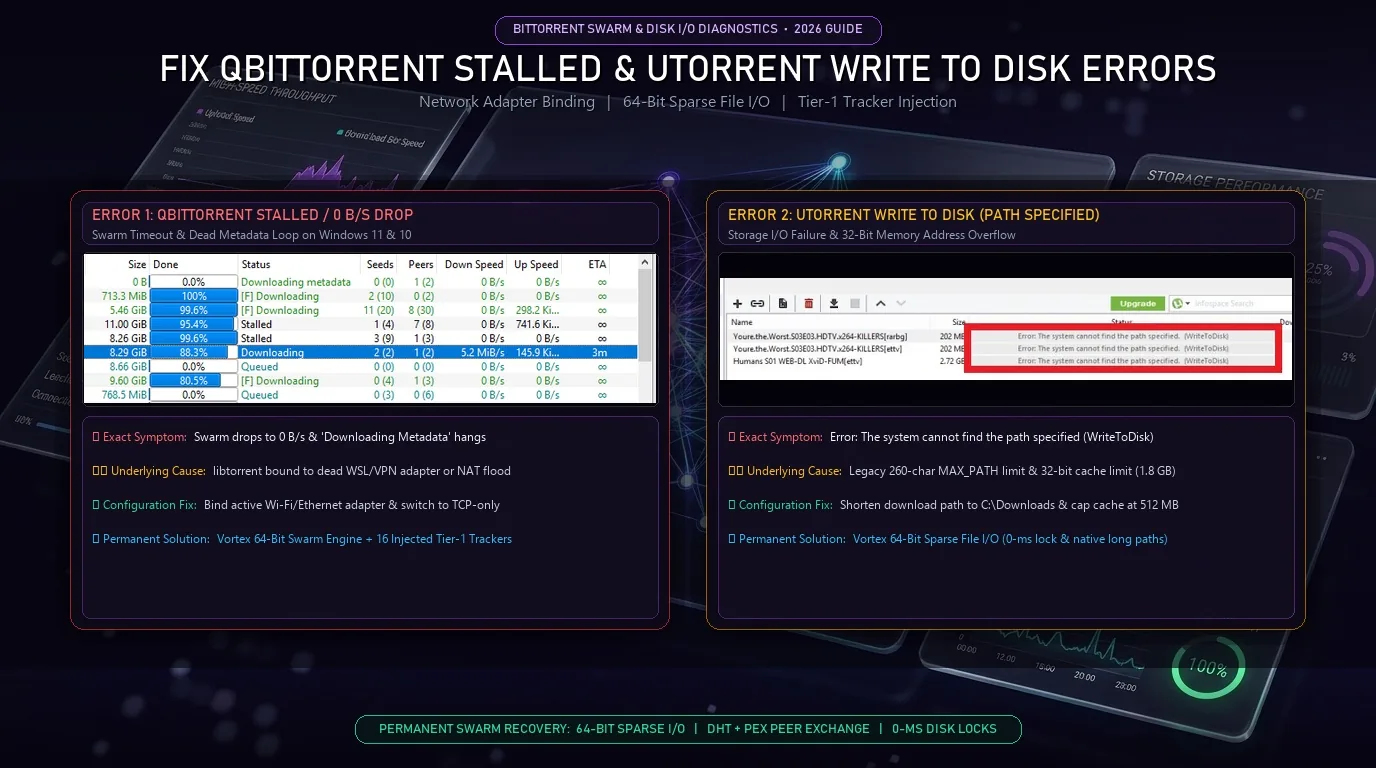
When qBittorrent starts a transfer at full speed but drops to 0 B/s ('Stalled' or 'Downloading Metadata') after 5 to 15 minutes on Windows 10 and 11, the failure typically stems from three transport bottlenecks: network interface binding mismatches, half-open TCP/uTP socket exhaustion, or dead public trackers. If qBittorrent is bound to 'Any interface' while a VPN split-tunnel, WSL virtual switch, or Hyper-V adapter is active, libtorrent network stack frequently routes DHT announces through an inactive local IP address. Simultaneously, consumer routers often drop UDP packets when global connections exceed 500 concurrent sockets. Binding the client directly to your active physical adapter, switching the peer protocol to TCP-only, or using Vortex Downloader's native 64-bit BitTorrent swarm engine (which automatically injects 16+ verified tier-1 public trackers and manages BitTorrent BEP 5 DHT socket pools dynamically) prevents mid-transfer stalls permanently.
Step-by-Step Fix for qBittorrent Dropping to 0 B/s
Bind qBittorrent to Your Active Network Adapter
Open Tools > Options > Advanced, locate Network interface, and change it from Any interface to your active physical Ethernet, Wi-Fi, or VPN tunnel adapter. Set Optional IP address to bind to to All IPv4 addresses so libtorrent does not stall on dead IPv6 routes or inactive WSL virtual switches.
Switch Peer Connection Protocol from TCP and μTP to TCP
Open Tools > Options > Connection and set Peer connection protocol to TCP. Many commercial ISPs throttle UDP-based Micro Transport Protocol (μTP) packets after sustained high-bandwidth bursts, causing downloads to drop to 0 B/s after 10 to 15 minutes.
Prevent Router NAT Table Exhaustion
In Tools > Options > Connection, set Global maximum number of connections to 350 and Maximum number of connections per torrent to 80. Setting unlimited connections overwhelms consumer router RAM tables, resulting in home network dropouts and stalled torrents.
Inject Verified Tier-1 Trackers or Switch to Vortex
Dead swarms stall when default announce URLs time out. For a detailed architectural breakdown, explore our Vortex vs qBittorrent 2026 speed and streaming benchmark or load your magnet link directly into the Vortex 64-Bit BitTorrent & Magnet Client, which auto-injects 16+ verified tier-1 public trackers on every handshake.
How to Fix uTorrent "Error: Write to Disk" and "Not Seeding" on Windows 11
In legacy 32-bit torrent clients like uTorrent Classic, two storage and swarm failures frequently halt transfers on Windows 10 and 11: 'Error: Write to Disk (Access is denied / Not enough memory)' and completed torrents refusing to seed. Write-to-disk errors occur when Windows Controlled Folder Access blocks unverified 32-bit executables, when folder paths exceed the legacy 260-character MAX_PATH limit, or when uTorrent's 32-bit RAM cache overflows above 1.8 GB on high-speed gigabit fiber lines. Meanwhile, 'uTorrent not seeding' happens when ISP Carrier-Grade NAT (CGNAT) blocks incoming UPnP port mapping or corrupted resume.dat state tables fail to broadcast BitTorrent PEX handshakes. Vortex Downloader eliminates 32-bit memory ceilings using 64-bit pre-allocated sparse files, supports long NTFS directory paths natively, and maintains active DHT/PEX peer exchange with customizable upload bandwidth caps across all active torrents.
4 Fixes for Error: Write to Disk and Ran Out of Memory
Shorten the Save Path Below 260 Characters
Multi-file torrents often nest subfolders inside long release names. Right-click the stopped torrent, select Advanced > Set Download Location, and point it to a root directory like C:\Downloads or D:\Torrents to bypass Windows 32-bit MAX_PATH limits.
Fix 32-Bit RAM Cache Overflows
If uTorrent throws Error: Write to Disk or Windows ran out of memory during fast downloads, open Options > Preferences > Advanced > Disk Cache, check Override automatic cache size, and set it to 512 MB. If the app continues to freeze or crash, follow our comprehensive guide on why uTorrent keeps crashing on Windows 11 and how to fix it.
Skip Unwanted Files to Reclaim SSD Space
Disk write errors also trigger when pre-allocated .part files exceed available drive capacity. You can download only specific files from a torrent or magnet link inside Vortex Downloader by setting unwanted bonus .iso or sample video files to Skip / Do Not Download before starting the transfer.
Fix "uTorrent Not Seeding" via DHT, PEX & Queue Rules
Open Options > Preferences > BitTorrent and verify that Enable DHT Network, Enable Peer Exchange, and Enable Local Peer Discovery are all checked. Under Queueing, ensure Minimum ratio (%) is set to at least 100% or 150% so completed downloads do not immediately transition to Finished status and stop uploading to the swarm.
Architecture Comparison: uTorrent vs. qBittorrent vs. Vortex Basic & Pro
Compare memory architecture, stall recovery, file prioritization, and security attributes across desktop P2P clients:
| P2P & Acceleration Feature | uTorrent Classic (v3.6) | qBittorrent (Desktop) | ⚡ Vortex Basic (Free Forever) | 👑 Vortex Pro ($4.99/mo or $29.99 Life) |
|---|---|---|---|---|
| Memory & Disk Architecture | 32-Bit (1.8 GB Cache Limit) | 64-Bit (libtorrent v2) | 64-Bit Sparse File I/O (0-ms Lock) | 64-Bit Sparse File I/O (0-ms Lock) |
| Stall Recovery & Trackers | Manual Tracker List | Manual Tracker List | DHT + 16+ Auto-Injected Trackers | DHT + 16+ Trackers + RSS Auto-Poller |
| Selective File Priority | Basic Skip / Priority | High / Normal / Low / Skip | High / Normal / Low / Skip + Re-Queue | High / Normal / Low / Skip + Re-Queue |
| Sequential Video Streaming | Paid Ad-Supported Tier | External VLC .!qB Workaround | Built-in Desktop Media Player | Instant 8K HDR Player + Streamer |
| Direct HTTP & Cloud Speed | None (Torrent Only) | None (Torrent Only) | Up to 3 Parallel HTTP Connections | Up to 32 Parallel HTTP Connections |
| Video Stream Grabber | None | None | Up to 1080p Full HD (1,800+ Sites) | Up to 8K 60FPS HDR + Video Clipper |
| Windows 11 Security Status | Flagged as PUA:Win32 Adware | Clean (No Built-in AV Scan) | VirusTotal 0/58 + Defender Auto-Scan | VirusTotal 0/58 + Defender Auto-Scan |
Frequently Asked Questions (FAQ)
Why does qBittorrent start downloading fast and then drop to 0 B/s after a few minutes?
Rapid speed drops to 0 B/s happen when your router's NAT table overflows from too many half-open UDP (μTP) peer connections or when Windows routes traffic through a disconnected virtual network adapter. Switching the peer protocol to TCP, capping global connections at 350, and binding qBittorrent to your physical Wi-Fi or Ethernet interface resolves the stall.
How do I fix "uTorrent Error: Write to Disk" on Windows 11?
First, move the torrent save directory to a short root path such as C:\Downloads to avoid the 260-character path limit. Second, check that Windows Controlled Folder Access is not blocking the folder. To permanently eliminate 32-bit disk cache overflows on large multi-gigabyte torrents, use Vortex Downloader's 64-bit sparse file engine.
Why is uTorrent blocked by Windows 11 Defender?
Microsoft Defender SmartScreen and Antivirus classify legacy uTorrent installers under PUA:Win32/uTorrent (Potentially Unwanted Application) because they bundle third-party promotional offers and background processes. Vortex Downloader (v1.1.3) is 100% adware-free, verified 0/58 Clean on VirusTotal, and automatically scans every downloaded file with Windows Defender.
Is Vortex Downloader's BitTorrent client free, and what does Pro add?
Yes. The Vortex Basic Edition is 100% free forever on Windows 10 and 11, including the complete 64-bit BitTorrent and magnet swarm client, per-file priority controls (High, Normal, Low, Skip), 16+ injected tier-1 trackers, up to 3 parallel HTTP connections, and 1080p video downloads. Upgrading to Vortex Pro ($4.99/month or $29.99 Lifetime, with a 7-day free Pro trial on every install) unlocks 15-minute automated Torrent RSS feed polling, all 32 parallel HTTP turbo connections, 8K 60FPS HDR video extraction, and the Overnight Scheduler.
Tired of Stalled Swarms, 0 B/s Drops, and Disk Write Errors?
Switch to Vortex Downloader: 100% Free 64-Bit BitTorrent engine forever, 16+ auto-injected tier-1 trackers, 0-ms memory-mapped sparse file I/O, selective piece prioritization, and integrated 8K video streaming. Certified 0/58 clean on VirusTotal.