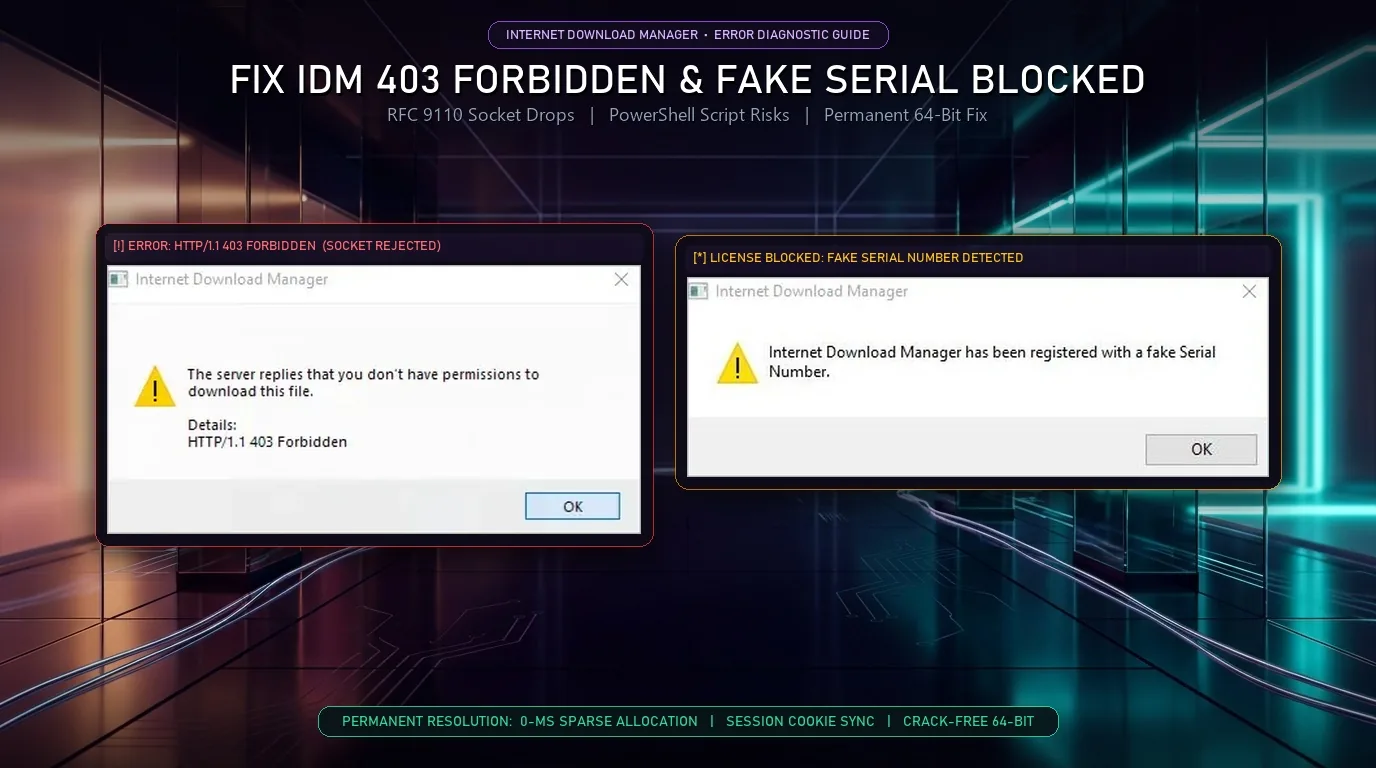
Internet Download Manager (IDM) triggers HTTP/1.1 403 Forbidden errors when expired session tokens, mismatched User-Agent headers, or Cloudflare bot checks reject multi-thread socket requests, while Fake Serial Number popups occur when background registry checks detect modified trial keys. Refreshing the download address or switching to Vortex Downloader resolves both issues.
Table of Contents
- Quick Diagnostic Matrix: IDM Error Messages, Causes & Permanent Fixes
- Interactive IDM Error & Socket Diagnostic Tool
- Why IDM Throws “HTTP/1.1 403 Forbidden” (And 4 Steps to Fix It)
- Why “Fake Serial Number” Popups Happen (And the Risk of Activators)
- Architecture Comparison: Legacy IDM vs. Vortex Basic & Vortex Pro
- Frequently Asked Questions (FAQ)
Quick Diagnostic Matrix: IDM Error Messages, Root Causes & Permanent Fixes
Use this matrix to identify whether your transfer is stalled by an authentication failure, an aggressive rate limit, or a background licensing thread:
| Exact IDM Error Message | What Triggers It on Windows 11 & 10 | Official IDM Workaround | Permanent Fix in Vortex Downloader (v1.1.3) |
|---|---|---|---|
| HTTP/1.1 403 Forbidden | Cloud host or CDN rejected multi-thread sockets due to expired session cookies or mismatched User-Agent headers. | Right-click stalled job → Refresh Download Address and re-capture link in browser. | 1-Click Session Cookie Sync & native User-Agent header mirroring across all threads. |
| IDM has been registered with a fake serial number | idman.exe detected a blacklisted serial key or third-party registry trial reset script. | Purchase a $24.95 license key or manually clean Windows registry keys. | $0 Forever Basic Edition (3 parallel streams, zero serial keys, never expires). |
| Your serial number has been blocked | Shared key from public forums or GitHub exceeded activation limits on Tonec validation servers. | Enter a newly purchased single-PC serial key in Registration > Registration. | Crack-Free Licensing: Free Basic tier or Vortex Pro (32 streams + 7-day free trial). |
| Cannot download this file (Timeout / Freeze at 99%) | Legacy 32-bit chunk stitching (chunk_01.tmp) locked by real-time antivirus disk scanning. | Disable antivirus file shield temporarily and wait for sequential disk stitching. | 0-ms Sparse File Allocation writes byte slices directly in place without temp-file freezes. |
Interactive IDM Error & Socket Diagnostic Tool
Select the specific alert message appearing on your screen to identify the underlying protocol fault and view the verified fix:
Cloud hosts such as TeraBox, PixelDrain, Gofile, and YouTube sign download URLs with temporary cryptographic tokens bound to your active session cookie, IP, and TLS fingerprint. When IDM opens multiple unauthenticated TCP sockets, the CDN server drops the connection with HTTP/1.1 403 Forbidden.
Why IDM Throws "HTTP/1.1 403 Forbidden" (And 4 Steps to Fix It)
An HTTP/1.1 403 Forbidden error in Internet Download Manager indicates that the remote media or cloud server understood the download request but refused to authorize the connection according to the official IETF RFC 9110 HTTP Semantics specification. Modern file hosts such as TeraBox, PixelDrain, Gofile, and YouTube generate temporary URLs tied to your active browser cookie, TLS fingerprint, and IP address. When IDM attempts to open 8 to 32 parallel TCP connections without passing the exact session cookie or matching User-Agent string, the server flags the traffic as an unauthorized leech attempt and drops the socket. Outdated browser integration modules (IDMGCExt) or expired signed URLs also trigger immediate 403 rejections when resuming paused multi-gigabyte archives. Updating the link session token inside your download manager or routing the transfer through a native browser messaging host restores server authorization without resetting completed byte segments.
Step-by-Step Fix for HTTP/1.1 403 Forbidden on Stalled Downloads
Refresh the Expired Signed URL
Open your IDM queue, right-click the stalled transfer showing HTTP/1.1 403 Forbidden, and select Refresh Download Address. When IDM launches your default web browser, trigger the download link again on the source page so IDM captures the fresh cryptographic session token and resumes from your saved byte offset.
Synchronize the Browser User-Agent Header
Certain cloud lockers reject requests where the socket User-Agent doesn't match the web browser. Press Win + R, type regedit, navigate to HKEY_CURRENT_USER\Software\DownloadManager, and ensure the UserAgent string reflects your current Chrome, Edge, or Firefox version.
Reduce Aggressive Socket Counts on Strict File Hosts
If a host rate-limits concurrent connections per IP address, open IDM → Options → Connection and lower Default max. conn. number from 32 or 16 down to 4 or 8 to prevent Cloudflare WAF anti-scraping blocks from tripping.
Use Native Session Cookie Injection for Cloud Lockers
When downloading from TeraBox, MediaFire, or PixelDrain, legacy HTTP grabbers frequently drop the ndus authentication cookie. Switching to the Vortex TeraBox & Cloud Downloader for PC links your active browser session in 1 click and streams archives across 3 free parallel connections (or 32 dynamic Pro connections) without 403 disconnects.
Why "Fake Serial Number" Popups Happen (And the Risk of Activators)
Users encountering the "IDM has been registered with a fake serial number" popup or frozen 30-day trials frequently search for GitHub serial keys or PowerShell activation scripts (such as PowerShell Invoke-RestMethod or irm commands). Security audits show that third-party IDM activator scripts and patched idman.exe binaries modify Windows registry keys under HKEY_CURRENT_USER\Software\DownloadManager and disable system firewall rules, frequently deploying info-stealing trojans that harvest saved browser credentials. Even when registry resets temporarily suppress the nag screen, IDM's background verification daemon re-validates the license hash against official servers and terminates active downloads mid-transfer. Replacing cracked 32-bit shareware with a verified 64-bit Windows downloader eliminates registry tampering and malware risks. Vortex Downloader provides a 100% free Basic Edition with 3 parallel TCP connections forever, alongside a 32-connection Pro Edition that includes a 7-day free trial.
How to Clean Corrupted IDM Registry Keys & Stop Popup Loops
Terminate Background Helper Processes
Press Ctrl + Shift + Esc to open Windows Task Manager. Locate Internet Download Manager (idman.exe) and IDMGrHlp.exe under Background processes, right-click, and select End Task.
Remove Unauthorized Trial Reset Scripts & Scan System
If you previously ran a batch script or PowerShell activator, open Windows Security → Virus & threat protection and execute a Full Scan to ensure no unauthorized scheduled tasks, persistence triggers, or Windows Firewall bypass rules remain active.
Uninstall Expired Trial or Enter Valid License
Either purchase an official lifetime license directly from Tonec IDM's official store or uninstall the expired 30-day trial via Settings → Apps → Installed apps so it ceases hijacking browser clicks and generating repeated error popups.
Install a Verified 64-Bit Replacement
Download the Vortex Free IDM Alternative for Windows 10 & 11 (v1.1.3), which is certified 0/58 Clean on VirusTotal and runs an automated Windows Defender CLI scan via Microsoft's native MpCmdRun engine on every completed download before opening.
Architecture Comparison: Legacy IDM vs. Vortex Basic & Vortex Pro
If you also experience system freezes when downloads finish, read our engineering breakdown on why IDM freezes at 99% during file reassembly. Below is how Vortex compares to standard web browsers and legacy IDM on Windows 10 and 11:
| Technical Specification | Standard Web Browser | Legacy IDM ($24.95) | ⚡ Vortex Basic (Free Forever) | 👑 Vortex Pro ($4.99/mo or $29.99 Life) |
|---|---|---|---|---|
| Parallel TCP Connections | 1 Single Stream | 8 Default (Up to 32) | Up to 3 Parallel TCP Streams | Up to 32 Turbo Streams (Work-Stealing) |
| Trial & Serial Key Policy | Free | 30-Day Hard Lockout ($24.95) | $0 Forever (No Serial Key Needed) | 7-Day Free Pro Trial • Instant Activation |
| HTTP 403 Token Recovery | Restarts at 0% on Drop | Manual Address Refresh | Site Logins Vault + Cookie Sync | Auto-Credential Injection + Byte Resume |
| 99% Disk Freeze Prevention | N/A | Stitches 32 .tmp Chunks | 0-ms Sparse File Allocation | 0-ms Sparse File Allocation |
| Video Stream Resolution | None | Legacy Floating Bar | Up to 1080p Full HD (1,800+ Sites) | Up to 8K 60FPS HDR + Video Clipper |
| Native BitTorrent Client | None | None (HTTP Only) | Built-in 64-Bit DHT Swarm & Priorities | Built-in Swarm + 15-Min RSS Auto-Poller |
| Malware & Virus Verification | Basic SmartScreen | Manual Antivirus Path | VirusTotal 0/58 + Defender Auto-Scan | VirusTotal 0/58 + Defender Auto-Scan |
Frequently Asked Questions (FAQ)
How do I fix "HTTP/1.1 403 Forbidden" in IDM without losing my download progress?
Do not delete the paused transfer from your queue. Right-click the item, choose Refresh Download Address, and click the download button again on the original webpage so your browser generates a fresh session token. For cloud hosts like TeraBox or PixelDrain that frequently drop single-cookie sessions, use Vortex Downloader's browser extension to sync active session cookies automatically.
Are GitHub IDM serial keys or PowerShell (irm) activation scripts safe to use?
No. Public serial numbers posted on GitHub or pastebins are blacklisted by IDM's validation servers within hours, triggering the "Your serial number has been blocked" alert. Furthermore, third-party PowerShell activation commands execute remote obfuscated scripts with administrator privileges, exposing Windows 10 and 11 PCs to credential-stealing malware.
Is Vortex Downloader completely free to use when switching from IDM?
Yes. The Vortex Basic Edition is 100% free forever on Windows 10 and 11 with zero serial keys, zero 30-day trial lockouts, up to 3 parallel TCP connections, unlimited 1080p video downloading, and a native 64-bit BitTorrent client. Every installation also includes a 7-day free Pro trial (no credit card required), and power users can upgrade to Vortex Pro ($4.99/month or $29.99 Lifetime) to enable all 32 parallel turbo connections and 8K 60FPS HDR video extraction.
Why does IDM fail on modern 4K/8K streaming sites and cloud folders?
Modern video platforms transmit streams above 720p via encrypted MPEG-DASH and HLS manifests where video (AV1/VP9) and audio (Opus) are separated, while cloud lockers require interactive directory parsing. Vortex Downloader includes a dedicated 8K Video Stream Grabber and Cloud Locker Resolver that merge streams natively.
Tired of IDM 403 Errors and Serial Key Nag Screens?
Switch to Vortex Downloader: 100% Free Basic Edition forever, up to 32 parallel turbo streams, native cookie syncing, 0-ms sparse file allocation, and built-in BitTorrent. Zero crack files. Certified 0/58 clean on VirusTotal.